Ecommerce
Why your Shopify store keeps overselling, and the fix that is not another app
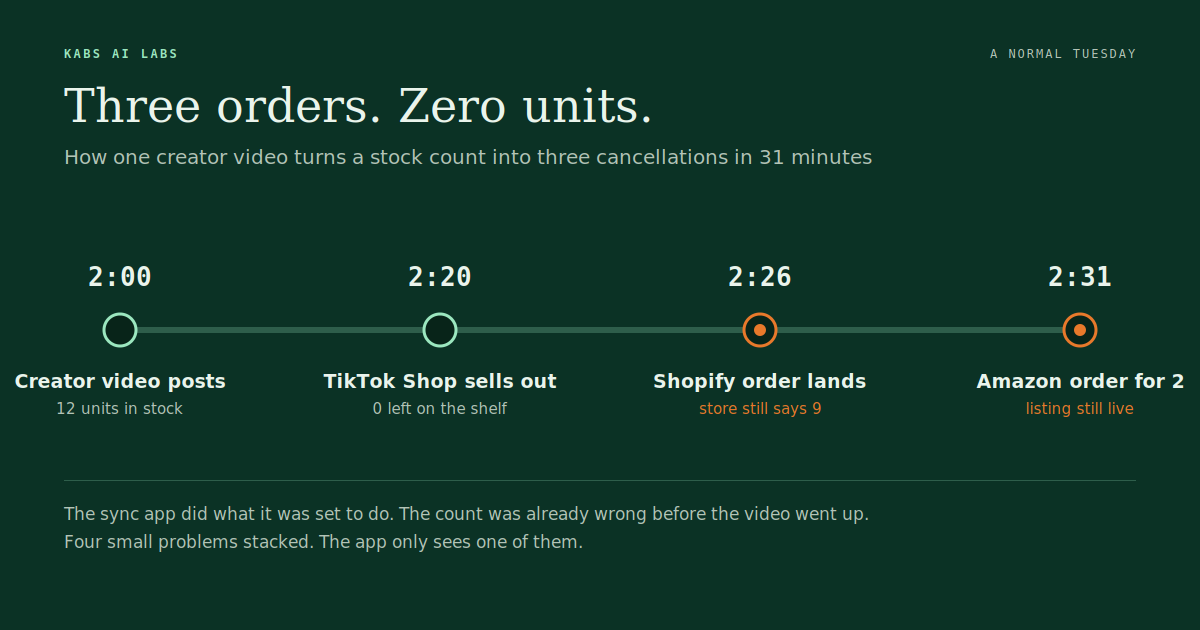
It is a normal Tuesday. A TikTok creator you sent a sample to posts a video at 2pm and it does better than either of you expected. By 2:20 your last twelve units of that colour have sold on TikTok Shop. At 2:26 someone buys one on your Shopify store, because your store still says nine in stock. At 2:31 an Amazon order lands for two more. You now have three orders for a product you do not have, on three platforms with three different rules about what happens next.
Most store owners blame the sync app when this happens. Sometimes that is fair. Most of the time it is not. The app did what it was configured to do, and the stock count was already wrong before the video went up. I have looked inside enough of these setups now to say that the oversell is almost never one problem. It is four small ones stacked on top of each other, and the app only sees one of them.
This post walks through the four, with the numbers behind each, what store owners on the Shopify forums and Amazon forums have been saying about it, and the fix in the order that actually works. Near the end there is a simple way to work out what overselling costs you each month, because that number decides whether any of this is worth fixing.
The short answer
Stock drifts between channels for four reasons, and they compound. Sync delay is the one everybody talks about. Bundles and variants that count the same unit twice is the one nobody notices until an audit. Returns, 3PL receipts and purchase orders that never make it back into the count is the slow leak. And people editing stock by hand in two places is the one that undoes every fix you make to the other three.
| Reason | What it looks like | How fast it bites | Who usually spots it |
|---|---|---|---|
| Sync delay | Store says 9, TikTok already sold them | Minutes, during any spike | The customer, by cancellation email |
| Double counting | A kit of three sells, only the kit's count drops | Days to weeks | Whoever does the next stock take |
| Missing inbound and returns | 3PL received 200, Shopify still says 40 | Weeks | The accountant, at month end |
| Manual edits | Two people "fix" the same SKU differently | Same day | Nobody, until the oversell |
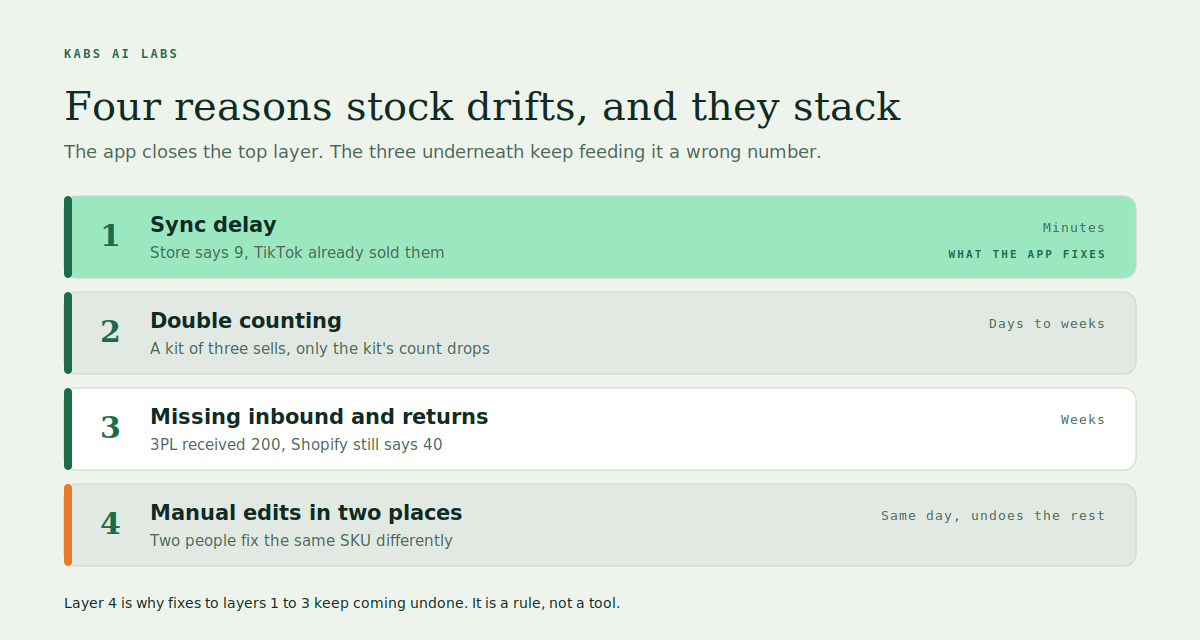
The fix is not a better app, or not only. It is deciding which system is allowed to be right, putting a small buffer between that number and each channel, moving from polled sync to event-driven sync where the money is, and running a weekly reconciliation that catches the slow leaks before they become a Tuesday. An app can do parts of that. It cannot decide the first part for you, and that is where most stores are actually stuck.
Reason one: the sync is slower than your customers
Most connector apps do not watch your store. They ask it a question on a timer. Every fifteen minutes, or every hour on cheaper plans, the app polls each channel, compares the numbers, and pushes updates. Between two polls, nothing moves. If a video, an email, or a marketplace deal sells through a SKU inside that window, every other channel keeps selling a number that stopped being true a while ago.
The gap is bigger than it sounds. A breakdown by TK Turners puts event-driven webhook sync at 30 to 90 seconds of lag, fifteen-minute polling at 5 to 15 minutes, and hourly ERP polling at 30 to 60 minutes. Their figure for a fifteen-minute poll in a busy store is a median overselling window of 3 to 7 minutes on every cycle. That is not a rare edge case. That is every quarter hour, all day, on your best-selling products.
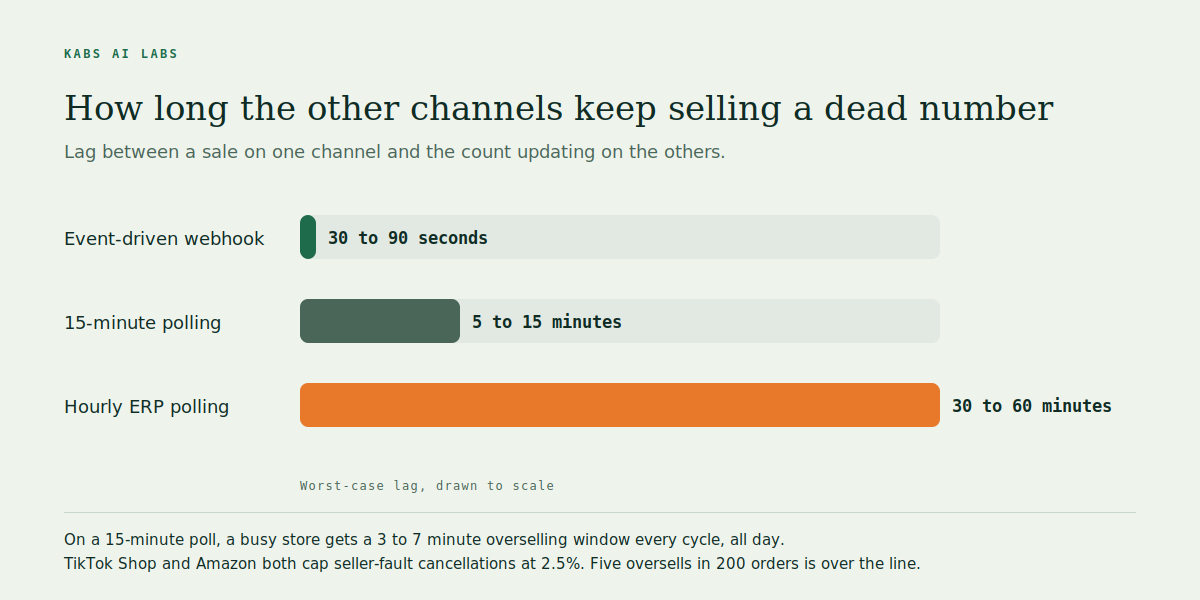
The platforms do not care why. TikTok Shop treats an out-of-stock cancellation as seller fault and requires a seller-fault cancellation rate of 2.5% or lower. Go over it and you get points against the account, less visibility, a longer settlement period, or an order cap. Amazon's pre-fulfilment cancel rate target is also 2.5% on a seven-day window, and sellers on the Amazon forums trade tips about staying under 5% because that is where suspensions start. On a store doing 200 orders a week, five oversells is enough to trip both.
There is a second kind of delay hiding inside the first. Some connectors fire their update when an order is fulfilled, not when it is placed. On a fast day that means the stock number lags by however long it takes your warehouse to pack, which can be hours. If your app has a setting for this, it is the first thing to check.
Reason two: bundles and variants that count the same unit twice
A gift set of three candles is one product on your store and three products in your stockroom. When the set sells, Shopify drops the set's count by one. The three individual candles, which you also sell on their own and on Amazon, do not move. You now have three listings that believe in stock that has already left the building. Every bundle, kit, multipack and "buy two, save 10%" variant does this unless something is tracking the components underneath.
Variants cause the same problem sideways. A T-shirt in five sizes and four colours is twenty SKUs. If one channel lists it by size only, or the SKU codes were typed differently when the Amazon listing was set up two years ago, the connector has nothing to match on. It either skips those units or, worse, maps them to the wrong variant. Apparel, footwear and beauty stores get this the most because they have the most variants, which is exactly what a Sqquid post on connector failures lists first: variant matching, duplicate SKUs, and broken product associations.
This one is quiet. Nothing breaks on the day. You find out weeks later when a stock take comes back short and nobody can explain where forty units went. They went out inside bundles that never subtracted them. The fix is dull and specific: track every component, make the bundle a virtual product whose availability is the minimum of its parts, and make sure every channel uses the same SKU string down to the last character.
Reason three: stock that comes in and never gets counted
Sync apps are good at subtracting. They are bad at adding. A sale is an event every platform announces loudly. A return arriving at the warehouse, a 3PL confirming a 200-unit receipt, or a purchase order half-delivered because the supplier short-shipped, are events that live in an email, a PDF, or a portal nobody has connected to anything.
So the count drifts downward. Returns get refunded but not restocked, and the item sits on a shelf while every channel shows it sold out. Or the opposite: the 3PL books in a delivery, someone updates Shopify by hand from the packing slip, the supplier actually sent 180 not 200, and now you are twenty units over on every channel at once. Either way, the number in the system stopped matching the number on the shelf, and the sync app faithfully spread the wrong number everywhere.
The SellerChamp guide from March this year lists returns and cancellations not being updated as one of its seven causes of overselling, alongside multiple warehouses and manual spreadsheets. In our own audits it is the most common thing the owner does not know about. They know sync delay exists. They do not know their returns process has quietly disconnected from their stock count since the last staff change.
Reason four: two people fixing the same number
Every multi-channel store I have looked at has at least two people who can edit stock, and at least two places they can do it. One adjusts Shopify after a stock take. Another adjusts Amazon Seller Central after a customer complaint. The sync app then has to decide which of them is right, and it decides based on whichever update it saw last, which is not the same as whichever was correct.
This is the reason the other three fixes keep coming undone. You can put a buffer on every channel and switch to real-time sync, and a well-meaning staff member can still type 50 into a box that should say 30 because a box on a shelf looked full. The connector will then push 50 everywhere within ninety seconds, which is the real-time sync working exactly as designed.
Shopify's own multi-location logic adds a version of this without any human involved. A merchant on the Shopify Community with two shops sixty miles apart described orders being fulfilled from one location while the stock lived at the other, pushing the count negative, because Shopify's default picks the location that minimises shipping cost rather than the one that has the item. Support's answer was to set fulfilment priority by hand. That is correct and it is also the point: the platform's defaults are not your rules, and until somebody writes your rules down, every person and every app is guessing.
The fix here is a rule, not a tool. One system is the source of truth. Everything else is read-only for stock. If a person needs to change a count, they change it there and nowhere else, with a reason logged. The moment that rule exists, the other three fixes stop unwinding.
What store owners are saying
I read the forums and the connector blogs before writing this, because our sample of audited stores is small and the complaints out there add up to a pattern.
| Where | Who | What they hit | What it tells you |
|---|---|---|---|
| Shopify Community | Two-store retailer with online sales | Orders fulfilled from the wrong location, stock pushed negative, told to set fulfilment priority manually | Platform defaults are not your rules |
| Shopify Community | Multi-location merchant | Selling into negative quantity across locations | Multi-location without written rules oversells on its own |
| Amazon Seller Forums | Seller doing 300 plus orders a month | Two cancellations pushed the 7-day cancel rate to 4.3% | Two oversells in a week is enough to breach 2.5% |
| Amazon Seller Forums | Suspended seller | Account suspended for high pre-fulfilment cancellation rate | The penalty is the account, not a fee |
| TikTok Shop Seller University | TikTok's own policy | Out-of-stock cancellation is seller fault, hard cap 2.5% | Every oversell on TikTok counts against you |
| TK Turners | Integration consultancy | 15-minute polling gives a 3 to 7 minute oversell window per cycle; overselling costs 2 to 4% of GMV | The cost is bigger than the refund |
| SellerChamp | Listing tool, March 2026 | Seven causes including bundles, returns and spreadsheets; buffer example of holding 20 and listing 17 | Buffers are normal practice, not a hack |
| Sqquid | Connector vendor | Variant matching, duplicate SKUs and broken associations break TikTok sync, worst in apparel and beauty | SKU hygiene is a prerequisite, not a nice to have |
| Sumtracker | Inventory app | Admits syncing "isn't always as seamless as many sellers expect" | Even the vendors say the app alone is not enough |
A note on Reddit. There is a steady stream of overselling posts on r/shopify and r/ecommerce, but the search results I could open cleanly were the Shopify Community and Amazon forum threads above, so those are what I have cited. If you have a Reddit thread that changed how you run stock, send it and I will add it.
The thread through all of it is the same one I keep seeing in audits. Vendors describe overselling as a sync speed problem, because speed is what they sell. Sellers describe it as a cancellation rate problem, because that is what hurts. Both are right and both are downstream of the real cause, which is that nobody in the business has decided which number is the true one.
The fix, in the order it works
Do these in order. Each one only holds if the one before it is in place.
- Pick one source of truth. It can be Shopify, your 3PL's system, or a standalone inventory tool. It cannot be "whichever one was updated last". Write down which system owns the stock number and make every other channel read-only for stock. If two people can edit stock, one of them loses that permission today.
- Fix the SKUs before you fix the sync. Every variant on every channel gets the same SKU string, character for character. Every bundle becomes a virtual product whose availability is the minimum of its components. This is a spreadsheet job, it is boring, and skipping it is why the expensive sync app you bought last year did not work.
- Put a buffer between the true count and each channel. If you hold 20, list 17 on the slow channels and maybe 19 on the one that sells fastest. The buffer is not lost sales. It is the units that would otherwise become cancellations, and cancellations cost more. A starting rule from the TK Turners piece is to set your low-stock line at twice your average daily sell-through, then tune per channel.
- Move from polling to events where the money is. Your top twenty SKUs by revenue should update on order creation, not on a fifteen-minute timer, and not on fulfilment. Shopify webhooks, TikTok Shop order events and Amazon order notifications all fire within seconds. The long tail can stay on a timer.
- Connect the inbound side. Returns received, 3PL receipts, and purchase orders delivered need to write into the source of truth, and they need to write the received quantity, not the ordered one. This is usually the piece nobody has built. It is also where the slow leak lives.
- Run a weekly reconciliation report. Source of truth versus each channel versus the last physical count, per SKU, with any gap over a threshold flagged. Ten minutes on a Monday. This is what catches steps 2 and 5 drifting before they become a Tuesday oversell.
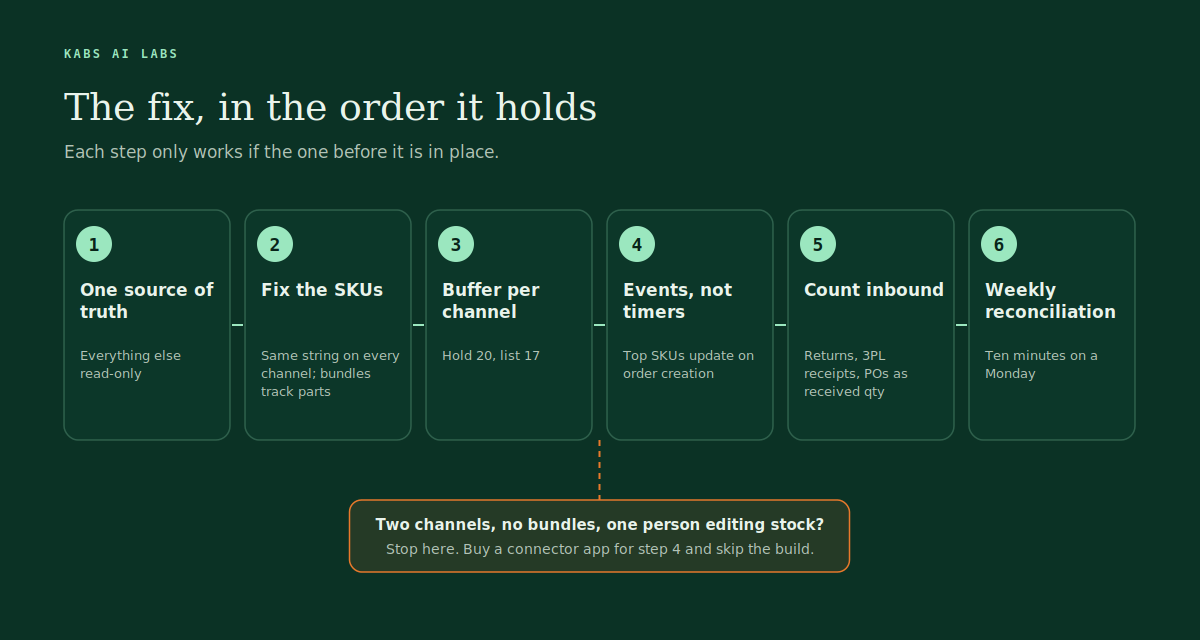
When an app is enough. If you sell on two channels, your products have no bundles, one person edits stock, and you do not run flash sales or live selling, a good connector app on its fastest plan plus a buffer will get you most of the way. Do steps 1 to 3 yourself and let the app do step 4. Do not build anything.
When it is not. If you have bundles, three or more channels, a 3PL, wholesale orders coming in by email, or you have already been warned on TikTok or Amazon about cancellation rate, an app is one part of the system and the rest has to be built around it. That is the point where the arithmetic in the next section decides whether it is worth building.
What overselling actually costs you
The refund is the smallest part. Here is the sum we run on the audit call, with example numbers for a store doing 800 orders a month at an average order value of $60.
| Line | How to get it | Example |
|---|---|---|
| Oversells per month | Count cancellations with reason "out of stock" across all channels | 12 |
| Refund and payment fees | Oversells x AOV x roughly 3% | 12 x $60 x 0.03 = $22 |
| Support time | Oversells x 15 minutes x staff cost per hour | 12 x 0.25 x $25 = $75 |
| Goodwill spend | Discount codes or free shipping given to keep the customer | 12 x $8 = $96 |
| Lost repeat purchases | Oversells x share who never return x their expected next-year value | 12 x 0.4 x $120 = $576 |
| Marketplace penalty exposure | If cancel rate is near 2.5%: risk to Buy Box, visibility, or the account | Hard to price. Often the whole channel |
| Total, before penalties | Sum of the lines above | About $770 a month |
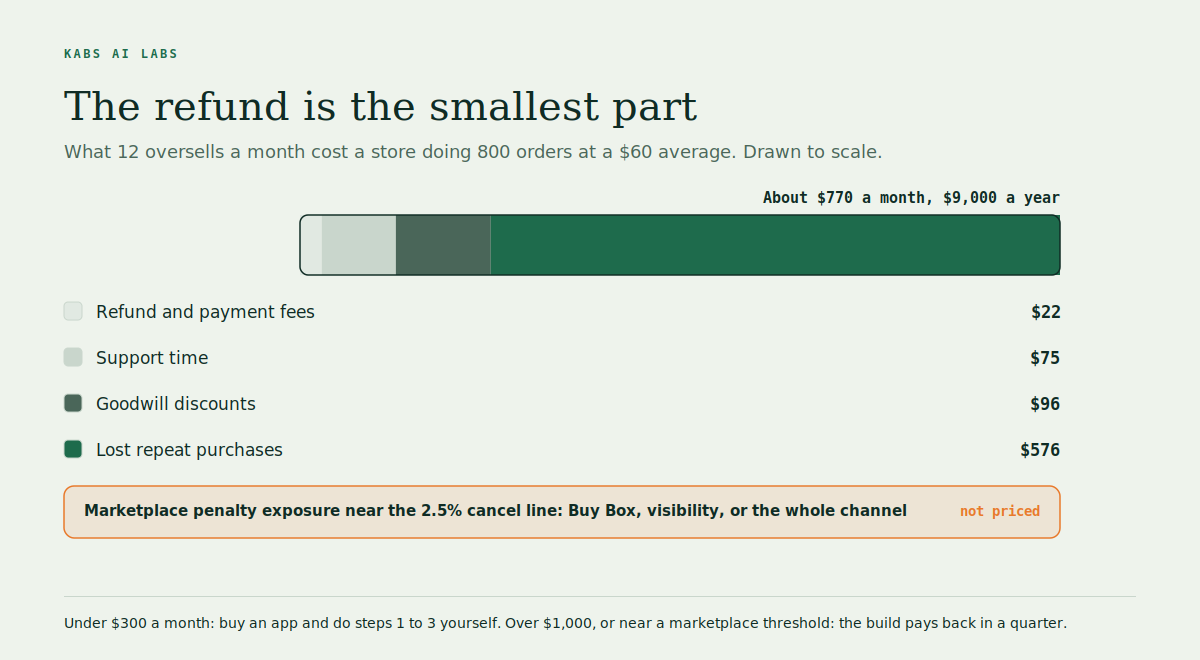
That is around $9,000 a year for a store that considers overselling a minor nuisance, and it does not include the channel risk, which is the line that actually keeps people up at night. TK Turners puts the all-in cost across refunds, penalties and compensation at 2 to 4% of gross merchandise value. On $48,000 a month that is $960 to $1,920, which lands in the same range as our sum.
Now compare it to the fix. A connector app on a fast plan runs $50 to $300 a month. A built system with buffers, event-driven sync on top SKUs, inbound connections and a reconciliation report is a setup fee plus a retainer. If your oversell cost is under $300 a month, buy the app and do the first three steps yourself. If it is over $1,000, or you are within a point of a marketplace threshold, the build pays back inside a quarter. If it is in between, the honest answer depends on how many channels you plan to add next year.
If you want the sum done on your own numbers, the oversell risk page has a version you can fill in.
What we build for this, and when we say no
We build the version of steps 1 to 6 that fits the store, using n8n as the backbone and the channels' own webhooks and APIs rather than a fourth app in the middle. The source of truth stays wherever the client already trusts. Buffers are set per channel and per SKU velocity, not one number for everything. The top SKUs update on order creation. Returns, 3PL receipts and POs are read by AI out of the emails and PDFs they arrive in and posted into the count as received quantities. The reconciliation report lands in Slack or email on Monday morning with only the gaps that matter.
Most focused builds are live inside four to six weeks. We read every output for the first month before anyone trusts it, including us.
We also turn down about half the stores that ask. If you are on two channels with no bundles and one person editing stock, we will tell you to buy an app and send you the checklist for the first three steps instead. If your stock counts live in screenshots or a notebook, we fix the data before we build anything on it, because automating a wrong number just delivers the wrong number faster. And if your oversell cost comes out under the cost of the build, we say so on the call and stop there.
The ecommerce page has the full list of what we plug and the audit is thirty minutes, free, and is mostly us asking how one week of your stock process actually happens.
Questions people ask
Why does my Shopify store oversell even with an inventory sync app? Because the app fixes one of four causes. It closes the sync delay, partly, but it cannot see bundles that double-count, returns that were never restocked, or two staff members editing the same SKU in two places. Those three keep feeding it a wrong number to spread.
How long does Shopify take to sync inventory to TikTok Shop or Amazon? It depends on the connector, not on Shopify. Polled connectors update every 15 to 60 minutes, which leaves a 3 to 7 minute overselling window on each cycle in a busy store. Event-driven sync built on webhooks updates in 30 to 90 seconds.
What cancellation rate gets a TikTok Shop or Amazon account in trouble? TikTok Shop's hard requirement is a seller-fault cancellation rate of 2.5% or lower, and out-of-stock cancellations count as seller fault. Amazon's pre-fulfilment cancel rate target is also 2.5% over seven days, and sellers report suspensions starting around 5%.
Should I turn off "continue selling when out of stock" on Shopify? Yes, for every tracked product and variant, unless you deliberately run backorders and have told customers so. It is the single setting that turns a sync lag into an oversell.
How much buffer stock should I keep per channel? Start by listing two to three units fewer than you hold on each channel, or set your low-stock line at twice your average daily sell-through, then widen the buffer on the channel that spikes and narrow it on the slow one. The buffer should be per SKU velocity, not one number for the whole catalogue.
Do I need to build something or is an app enough? Two channels, no bundles, one person editing stock, no live selling: an app plus a buffer is enough. Three or more channels, bundles, a 3PL, wholesale by email, or a marketplace warning already received: the app becomes one part of a built system, and the oversell cost sum above tells you whether the build pays back.
Your build starts with the arithmetic.
Bring a week of real examples to the free audit. We come back with the three worth doing first, what each is worth, and a fixed price. If a cheaper tool already covers it, we say so.
Book the free audit →Sources
- TikTok Shop Seller University, seller-fault cancellation rate requirements
- Amazon Seller Forums, pre-fulfilment cancellation rate above 2.5%
- Amazon Seller Forums, suspended for high pre-fulfilment cancellation rate
- Shopify Community, inventory updates overselling stock and creating negatives
- Shopify Community, inventory selling into negative quantity at multiple locations
- TK Turners, why your Amazon and Shopify inventory never match
- SellerChamp, Shopify inventory management and preventing overselling
- Sqquid, Shopify to TikTok connector problems
- Sumtracker, Shopify and TikTok Shop inventory sync