AI automation
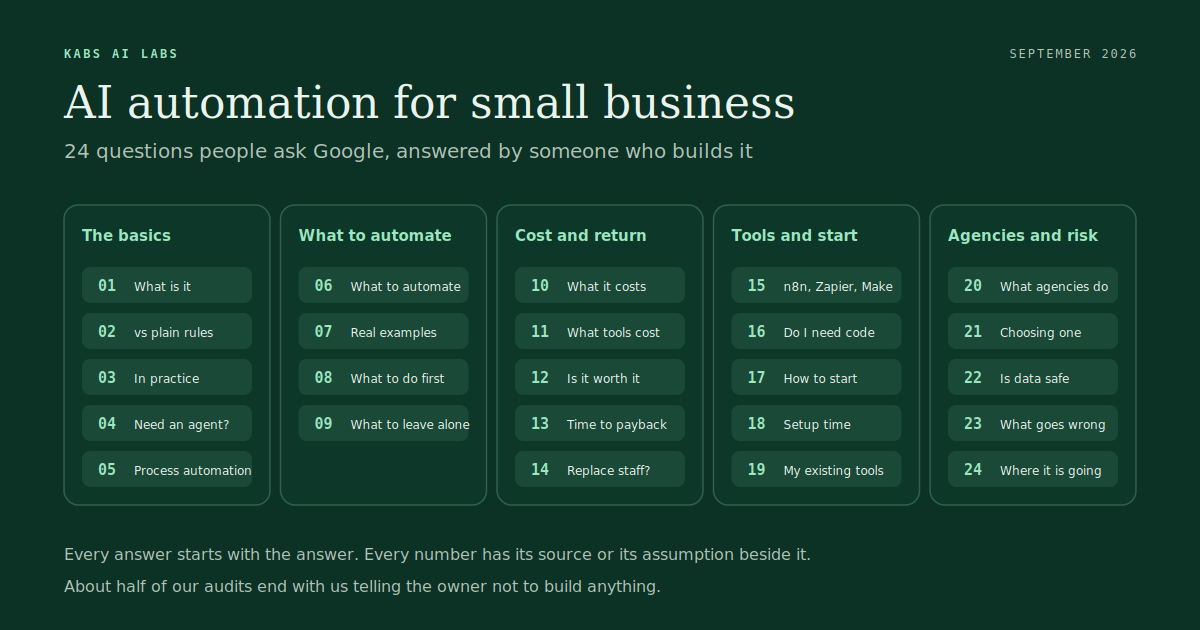
AI automation for small business: 24 questions people ask Google, answered by someone who builds it
AI automation for a small business means software that reads, decides and acts on the repetitive work your team does by hand: answering the phone, chasing invoices, typing orders into three systems. It costs between $50 a month in tools and a few thousand dollars in a custom build, and it pays back when the task it replaces costs more than the system that does it.
That is the short answer. The rest of this page is the long one. It exists because the same twenty-four questions come up on nearly every audit call we run, and because most of the pages that rank for those questions are written by people who sell the software, not by people who install it and then watch it fail on a Monday morning.
I run a two-person AI automation agency. We build support agents, invoice readers, lead follow-up systems and order pipelines for ecommerce brands, marketing agencies, real estate offices, SaaS startups, clinics and plumbers. About half of our audits end with us telling the owner not to build anything. So the answers below include the parts a vendor would leave out: what it actually costs, when it does not pay, and how to tell a real agency from a slide deck.
Use it however you like. Read it top to bottom, or jump to the question you typed into Google. Every answer starts with the answer, and every number has its source or its assumption beside it.
The basics
1. What is AI automation?
AI automation is software that does a repetitive task for you and uses an AI model for the parts that need reading, judgement or writing. A plain automation moves data from one box to another when a rule fires. An AI automation can look at an email, work out that it is a quote request for a bathroom refit in Houston, pull the right price list, and draft the reply. The AI does the understanding. The automation does the moving and the logging.
In practice it is three things stitched together: a trigger (a form, an email, a phone call, a new order), a model that reads and decides (Claude, OpenAI or a smaller model), and the tools you already use (your CRM, your inbox, your accounting software) that the result gets written into. Most of what we build runs on n8n as the backbone, with the model doing the reading and writing and your existing systems left exactly where they are.
2. What is the difference between automation and AI automation?
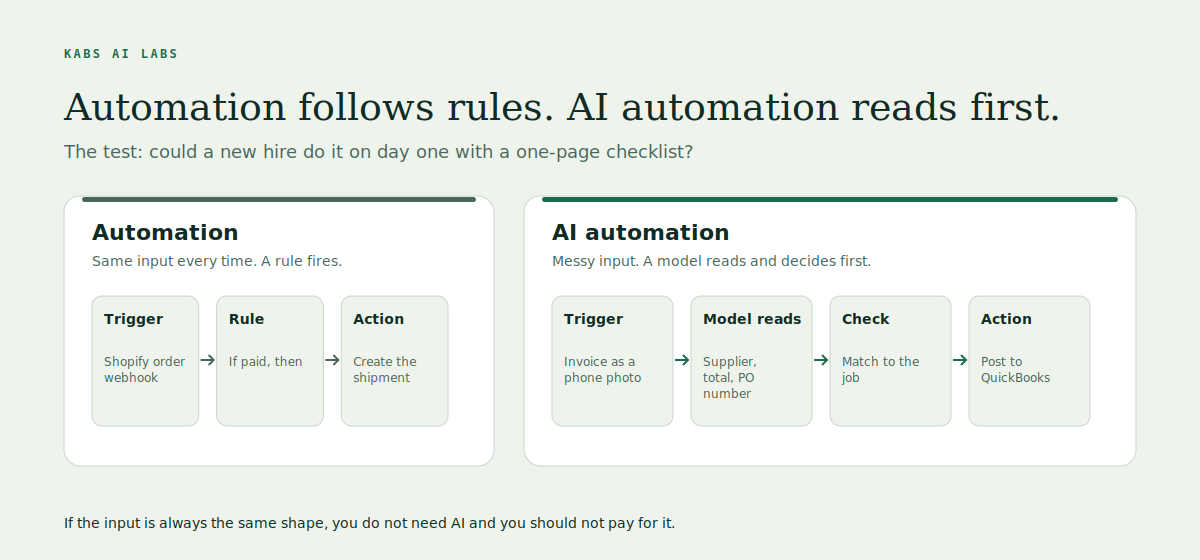
Automation follows rules you wrote. AI automation handles the cases you could not write a rule for. If the input is always in the same format, like a Shopify order webhook, you do not need AI and you should not pay for it. If the input is messy, like a supplier invoice as a phone photo, a customer describing their problem in their own words, or a voicemail, a rule cannot read it and a model can.
The test we use on audit calls is simple. Could a new hire do this task on day one with a one-page checklist? If yes, it is automation. If they would need to read something and make a small judgement each time, it is AI automation. A lot of what gets sold as AI is the first kind wearing a badge.
3. What is AI automation for small business, in practice?
For a business with two to fifty people it comes in three shapes. The first is an agent that talks: it answers the phone or the inbox or WhatsApp, answers from your real records, books the appointment, and hands the odd case to a human with the whole thread attached. The second is a workflow that moves data: a lead arrives and is qualified, scored, put in the CRM and followed up without anyone typing. The third is a document reader: invoices, insurance claims, purchase orders and PDFs read into your system, checked against the job, and posted where they belong.
Most of our clients start with one of these and add the next once the first has paid back. Nick's Plumbing in Houston started with an AI receptionist and booking. San Diego Apartment Experts started with lead response and routing. CanadaMedicalNotes started with documentation and intake. None of them started with all three.
4. What is an AI agent, and do I need one?
An AI agent is an automation that can take several steps on its own to reach a goal, choosing the next step based on what it found in the last one, rather than following a fixed path. A support agent that reads a complaint, looks up the order, checks the return policy, issues the refund and writes the reply is an agent. A workflow that sends the same three emails to every new lead is not.
You need one when the task has branches you cannot predict. You do not need one when the task is the same every time, and an agent there is slower, dearer and harder to debug than a plain workflow. The most common mistake we see in 2026 is agents built for jobs that a fixed workflow would do better. Our rule is to build the fixed version first and only give the model freedom where the inputs demand it.
5. What is business process automation with AI?
Business process automation is the older, wider term for joining up a whole process end to end so that a person only touches it when something is wrong. Adding AI means the steps that used to need a human reader, like classifying an email, extracting the numbers from a PDF, or deciding which of four departments a request belongs to, can now run inside the process too.
A concrete version: an order comes in, stock is checked across every channel, the customer gets a real answer to "where is my order" without a ticket, the supplier invoice is read and matched to the purchase order, and the books are reconciled at month end without a spreadsheet. That is one process, five systems, and it is what our ecommerce clients mean when they say automation. The word "process" matters. Automating one step of a broken process just makes the mess arrive faster.
What can be automated
6. What can be automated with AI in a small business?
Anything that happens more than twenty times a week, takes a few minutes each time, and follows a pattern a model can learn from your past examples. That covers more of the working day than most owners expect. It does not cover judgement calls that carry real risk, relationships, or anything that happens twice a month.
| Function | What gets automated | What stays human |
|---|---|---|
| Front desk and support | Answering calls and messages from your real records, booking, rescheduling, order status, returns | Complaints, refunds over a threshold, anything angry |
| Sales and leads | Replying to a new lead in under a minute, qualifying, routing to the right person, follow-up sequences, win-back of old leads | The call itself, pricing exceptions |
| Documents and money | Reading invoices, claims and POs out of PDFs and photos, matching to jobs, posting to QuickBooks or Xero, chasing unpaid invoices | Approving payment, disputes |
| Operations | Stock synced across channels, orders pushed to the 3PL, meeting notes into tasks, weekly reports assembled from the systems | Deciding what to reorder, hiring |
| Marketing | Review requests after a job, repurposing one piece of content into five, listing updates across portals | Strategy, the brand voice |
The Automation Readiness Scorecard scores your business on eight of these in about three minutes and tells you which one to look at first.
7. What are real examples of AI automation?
Here are five we have built and can show you, with the stack, because "AI can do anything" is not an example. A support agent over WhatsApp and voice that answers customers from the business's own records, books and reschedules, and hands anything odd to a human with the full thread attached, built on WhatsApp, Retell and Claude. An invoice and claims reader that takes supplier invoices and insurance claim documents out of PDFs and photos, checks them against the job, and posts them to the books for approval, built on n8n, Claude and QuickBooks. A lead follow-up and win-back system in GoHighLevel that answers new leads in minutes, reopens old ones on a schedule, and logs every reply against the contact, built on GoHighLevel, n8n and Twilio. An AI receptionist and booking system for a Houston plumbing company. A lead response and routing system for a San Diego real estate office.
The case studies page has thirty of these, each one showing the actual workflow, what it replaced and what it costs to run. If a vendor cannot show you the workflow, they have not built it.
8. What should a small business automate first?
The one task that costs the most and has the cleanest input. Not the most exciting one. On our audit calls we ask the owner to walk us through one week of the task as it actually happens, count how often it happens, time it, and put an hourly cost on the person doing it. The winner is usually boring: lead follow-up that happens hours late, invoices that get typed in by hand, or the phone that rings while everyone is on a job.
For most trades and clinics it is the phone, and we wrote up when an AI receptionist pays for a trades business or clinic. The cheaper first step is a missed call text back that texts the caller within seconds. For most ecommerce brands it is stock or support tickets. For most agencies it is Monday morning client reporting. Start there, get it paid back, then add the next one. Businesses that try to automate six things at once end up with six half-working things and a person whose job is now babysitting them.
9. What should you not automate?
We turn down about half the builds people ask us for, and we use four rules to do it. If your phone rings fewer than twenty times a day, keep the receptionist, because a voice agent costs more to run than the calls it saves at that volume. If the data lives in screenshots or a notebook, fix the data first, because automating a broken input just delivers wrong answers faster. If a task takes under two hours a week, it gets a checklist, not a system, because a build has a setup cost and a monthly cost and both have to be smaller than the problem. And if nobody will check the first month of outputs, we do not ship, because every system needs a person reading it before it is trusted.
There is a fifth that is less about money. Do not automate the conversation that is the reason a customer chose a small business over a big one. If your clients pay for you, a bot answering as you is a slow way to lose them.
Cost and return
10. How much does AI automation cost for a small business?
Between $50 a month and about $40,000, depending on who builds it and how much of it is custom. That range is useless on its own, so here it is in the three tiers everyone in this market actually sells, with figures from a February 2026 cost breakdown that match what we see.
| Tier | What you get | Build cost | Monthly cost | Who it suits |
|---|---|---|---|---|
| Do it yourself with no-code tools | Zapier, Make or n8n workflows you build and maintain | Your time | $50 to $500 | One person, one or two simple workflows, technical enough to debug |
| Hybrid: tools plus some custom work | An agency or freelancer builds on n8n or Make, connects your systems, adds the AI reading | $5,000 to $15,000 | $200 to $800 in tools and API | Most businesses with 5 to 50 staff and a real process to fix |
| Fully custom | Code, your own hosting, built for scale | $10,000 to $40,000 | $5 to $50 hosting plus API | High volume, unusual systems, or compliance needs |
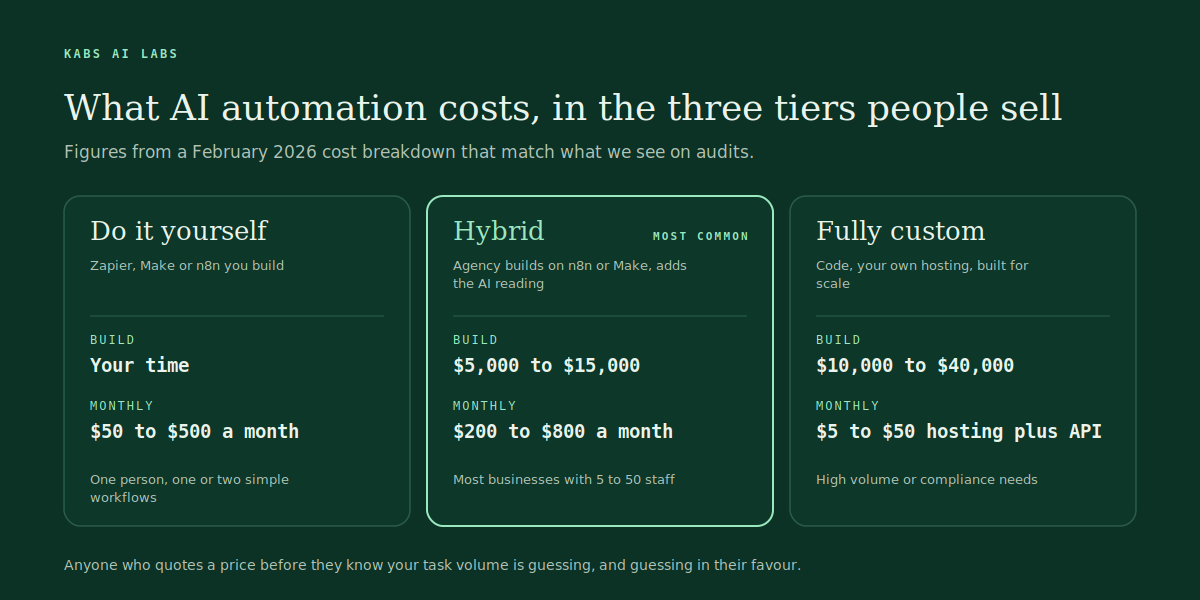
How we price it: a setup fee and a monthly retainer, and neither is quoted before the arithmetic. The audit is free, the one-page receipt that says what the task costs you now and what the build would cost comes within two working days, and if it does not pay back we say so and stop. Anyone who gives you a price before they know your task volume is guessing, and they are guessing in their favour.
11. How much do AI automation tools cost?
Less than the people time they replace, by a wide margin, and less than most owners expect. Current list prices, checked September 2026: Zapier Starter $19.99 a month and Professional $49. Make Core $10.59 and Pro $18.82. n8n cloud Starter €24 for 2,500 executions and Pro €60 for 10,000, per the September 2026 n8n pricing breakdown, or free if you host the community edition yourself. The AI model calls on top are priced per use: a small model like Claude Haiku runs a fraction of a cent per call, and a frontier model like Claude Fable 5.1 or GPT-6 Astra lists at $10 per million input tokens, which is still cents per document read. A typical support agent for a small store costs us more in phone minutes than in AI.
12. Is AI automation worth it for a small business?
Only if the task costs more than the system, and you can find out before you spend anything. The sum is the same one on our homepage: how many times a week the task happens, how many minutes it takes, what an hour of that person costs, and how often a mistake needs cleaning up. A task done 120 times a week at six minutes each is twelve hours a week, or 624 hours a year. At $28 an hour that is $17,472 a year before you count the mistakes. A hybrid build at $8,000 plus $400 a month pays back inside the first year, and everything after that is margin.
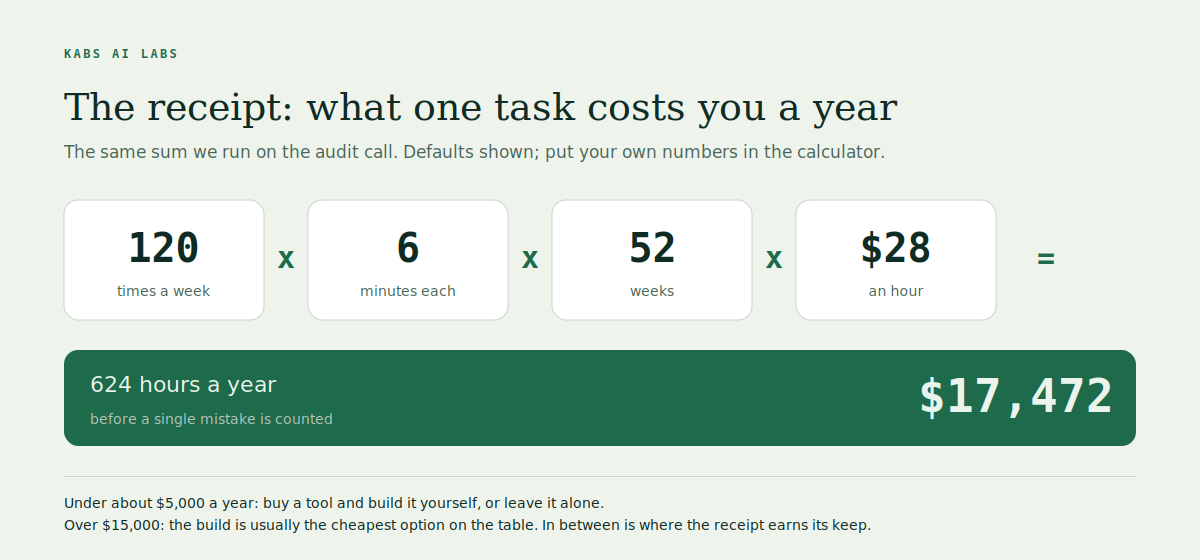
Run your own numbers in the cost of doing it by hand calculator. If the answer comes out under about $5,000 a year, buy a tool and build it yourself, or leave it alone. If it comes out over $15,000, the build is usually the cheapest option on the table. The honest zone is in between, and that is where the receipt earns its keep.
13. How long does it take to see a return?
Simple workflows built on tools pay back in the first month or two. A focused custom build takes two to six weeks to go live, then the first month is watched, so most clients see the payback month land somewhere between month three and month six. The one number that decides this is task volume: a system that runs 500 times a month pays back five times faster than one that runs 100 times, at the same build cost.
One warning. Payback assumes the system keeps running. Budget for the retainer or the maintenance time, because APIs change, a supplier changes their invoice layout, and the workflow that saved you $17,000 last year will quietly stop one Tuesday if nobody is watching it.
14. Can AI automation replace employees?
It replaces tasks, not people, and pretending otherwise is how businesses end up with a bot answering complaints and nobody who knows the customers. In our builds the person who used to do the task ends up checking the outputs for the first month, then handling the odd cases the system hands back, then doing the work that was never getting done because of the task. The receptionist rule above is the clearest case: under twenty calls a day the person is cheaper and better than the agent.
The Census Bureau's Business Trends and Outlook Survey from May 2026 puts AI use at 17 to 20% of US businesses, and under 20% for firms with four or fewer employees. The businesses reporting gains are the ones that gave people back their hours, not the ones that cut the hours out of the payroll.
Tools and getting started
15. Which is better for AI automation: n8n, Zapier or Make?
Zapier if you want the most integrations and the least thinking. Make if you want visual control over branching logic at a low price. n8n if you want to own the system, run AI agents inside it, and not pay per task once volume grows. We build on n8n, and here is the fair version of why.
| Zapier | Make | n8n | |
|---|---|---|---|
| Best for | Simple triggers between popular apps, non-technical owners | Multi-step visual workflows on a budget | AI-heavy workflows, self-hosting, high volume, custom code steps |
| Pricing shape | Per task, rises fast with volume | Per operation, cheap at low volume | Per execution on cloud (€24 for 2,500), free self-hosted |
| AI agents | Zapier Agents, easy but closed | Make AI Agents, improving | Native agent nodes, any model, full control |
| Where it hurts | Cost at scale, limited logic | Debugging complex scenarios | Steeper learning curve, you own the uptime |
If you have one workflow and it runs fifty times a month, Zapier is fine and we will tell you so. If you have five workflows with AI reading in the middle and they run thousands of times a month, the per-task pricing of Zapier becomes your biggest line item and n8n pays for itself in the first quarter.
16. Do I need to know how to code to automate my business with AI?
No for the first workflow, yes eventually for anything that touches money. Zapier and Make are built for people who have never written code, and a lead-to-CRM workflow is an afternoon's work. Where it gets hard is the edge cases: the invoice that arrives as a photo, the API that changes, the model that answers confidently and wrongly. That is where a line of JavaScript in an n8n node saves a week of clicking, and where most owners decide their time is worth more than the learning curve.
The useful question is not "can I code" but "who will fix it at 9am when it breaks". If the answer is you and you would rather not, that is the case for an agency retainer. If the answer is a technical person on your team, build it yourself and keep the money.
17. How do I start automating my business with AI?
Pick one task, count it, price it, prototype it, watch it. In that order and no faster. Pick the one task that eats the most of your week, the way we do on the audit call. Count how many times it happens and how long it takes, for one real week, not from memory. Put an hourly cost on the person and add the cost of cleaning up mistakes. Build the smallest version that could work, on your real data, before anything is switched on for customers. Then read every output for a month before you trust it.
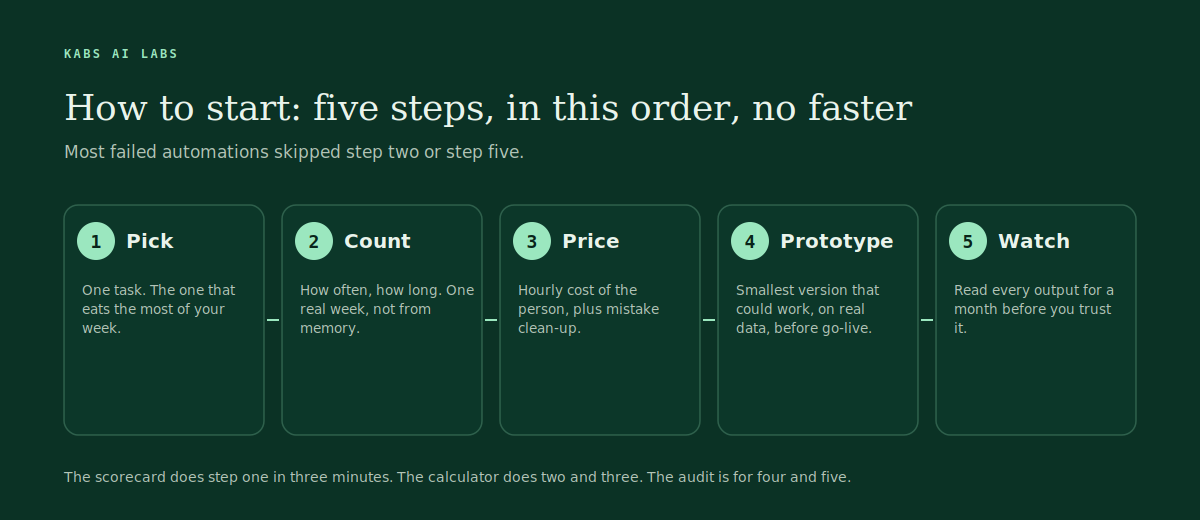
The readiness scorecard does the first step for you in three minutes, and the calculator does the second and third. If you want someone to do steps four and five, that is what the free audit is for. It is thirty minutes and we ask more questions than we answer.
18. How long does it take to set up AI automation?
Hours for a single Zap, days for a proper workflow, two to six weeks for a system that touches several tools and needs to be right. Our focused builds are live inside six weeks, and the schedule is always the same: a thirty-minute audit call, a receipt within two working days, a build of two to six weeks where you see it working on your real data before it goes live, and a month of us reading every output and fixing what is wrong the same day.
What stretches the timeline is never the AI. It is access to your systems, a data source that turns out to live in someone's inbox, and the week where nobody on your side has time to review the outputs. Plan for those and six weeks holds.
19. Does AI automation work with my existing tools?
Almost always, and if it does not, the fix is usually to change the automation, not the tools. Anything with an API or a webhook connects: HubSpot, GoHighLevel, Airtable, QuickBooks, Xero, Shopify, Stripe, Twilio, Slack, Notion, Google Workspace, Microsoft 365, and most industry systems. Anything without one, like a legacy desktop app or a portal with no export, can still be reached by a browser agent, though that is slower and more fragile and we say so.
The principle we hold to is that your existing tools stay in place. The people who tell you to move everything to their platform first are selling the platform. The workflow automation page lists what we connect most often, and the AI automation page covers the agents and document readers that sit on top.
Agencies and risk
20. What does an AI automation agency do?
A good one finds the task that costs you most, works out whether a system would cost less, builds it on your real data, and then watches it until it can be trusted. A bad one sells you a chatbot. The difference shows up in the first call: ours is thirty minutes of you walking us through one week of a task while we ask questions. Then a one-page receipt, then a build of two to six weeks with n8n as the backbone and Claude or OpenAI doing the reading, then a month of reading every output. After that the retainer covers changes, breakages and the next gap.
There are two people here and no account managers. That is not a boast, it is a warning about what you are buying. You get the builders on every call, and you do not get a team of twelve.
21. How do I choose an AI automation agency?
Ask four questions and walk away on the wrong answer to any of them. Will you quote me before you know how often the task happens? The right answer is no. Will I see it working on my data before it goes live? The right answer is yes. What happens in the first month after launch? The right answer involves a person reading outputs. Have you ever told a client not to build something? If they cannot name one, they have never run the arithmetic.
Then ask to see a workflow, not a demo. A demo is a video of the happy path. A workflow is the actual thing with the error branches visible. Ours are on the case studies page. Finally, check what they will be paid for. Setup plus retainer is honest. Per-seat licences for a platform you must migrate to are a lock-in with a lead-in.
22. Is AI automation safe for customer data?
It is as safe as the plumbing you build it with, and there are four things to get right. Keep the data in your own systems and send the model only what it needs for the step, not the whole database. Use a provider with a business agreement that excludes your data from training, which the major APIs offer. Log every action the system takes against a record, so you can answer "why did it do that" a month later. And give every workflow a human handoff for the cases it is not sure about, with the whole thread attached, rather than letting it guess.
For healthcare, finance and anything with regulated data, add your own compliance advisor to that list before you add us. We build for clinics and we still say that on the first call. Nothing here is legal advice.
23. What goes wrong with AI automation?
Four things, in the order we see them. Bad inputs: the process was already broken and now it fails faster. No owner: the system runs, nobody reads it, and a change at a supplier silently breaks it for three weeks. Wrong tool for the job: an agent built where a fixed workflow was needed, or a fixed workflow where the inputs are messy. And no buffer for judgement: the system does the right thing 97% of the time and nobody planned for the 3%.
The overselling problem in ecommerce is the cleanest example. Stores buy a sync app to stop selling stock they do not have, and it fails, because the count was already wrong before the app touched it. We wrote up why stores oversell even with a sync app, and the same four causes apply to almost every automation that disappoints.
24. What is the future of AI automation for small businesses?
More boring than the demos and more useful than the sceptics think. The Census Bureau's May 2026 survey has AI use at 17 to 20% of US businesses, expected to reach 20 to 23% within six months, with firms under twenty employees flat and firms under five below 20%. The gap is not the technology. It is that small businesses do not have anyone whose job is to install it.
The next two years look like this from where we sit. Agents that operate a browser and fill forms become normal, and the GPT-6 Astra and Claude Fable 5.1 models released this September already do it well, as we found when we tested both on client work. The cost of a model reading a document keeps falling towards zero. And the work moves from building automations to keeping them honest: reconciliation reports, logs, and a person who reads them. The businesses that win will not be the ones with the most automation. They will be the ones that know exactly what each system costs and what it saves, to the dollar, every month.
Where to start today
Two free tools and one call, in that order. The Automation Readiness Scorecard takes three minutes and tells you which of eight functions is leaking the most and whether your data is clean enough to build on. The cost of doing it by hand calculator turns one task into a yearly number, the same arithmetic we do on the audit, so you know before you talk to anyone whether it is a $2,000 problem or a $20,000 one.
If the number is big enough, book the free audit. Thirty minutes, the two people who build the system, and we come with questions rather than slides. If the number is small, keep the money and use the checklist in question 17. Either way you will know, and knowing is most of the work.
If you run a specific kind of business, the pages for ecommerce brands, marketing agencies, real estate, SaaS startups, healthcare practices and plumbers and trades each start with the one paperwork bottleneck that industry has, and what we plug it with. Pricing explains the setup fee and retainer model in full.
Your build starts with the arithmetic.
Bring a week of real examples to the free audit. We come back with the three worth doing first, what each is worth, and a fixed price. If a cheaper tool already covers it, we say so.
Book the free audit →Sources
- US Census Bureau, large firms with at least 20 employees are the biggest AI users, 26 May 2026
- Syntora, what AI automation actually costs for small business, 13 February 2026
- CloudZero, n8n pricing in 2026, 9 September 2026
- Google Search Central, guide to optimizing for generative AI features, updated 10 July 2026
- KABS AI LABS case studies and audit process, as published on kabsailabs.com